Free · No sign-up · Windows / Web / Android

Speed test and stream test
on one page

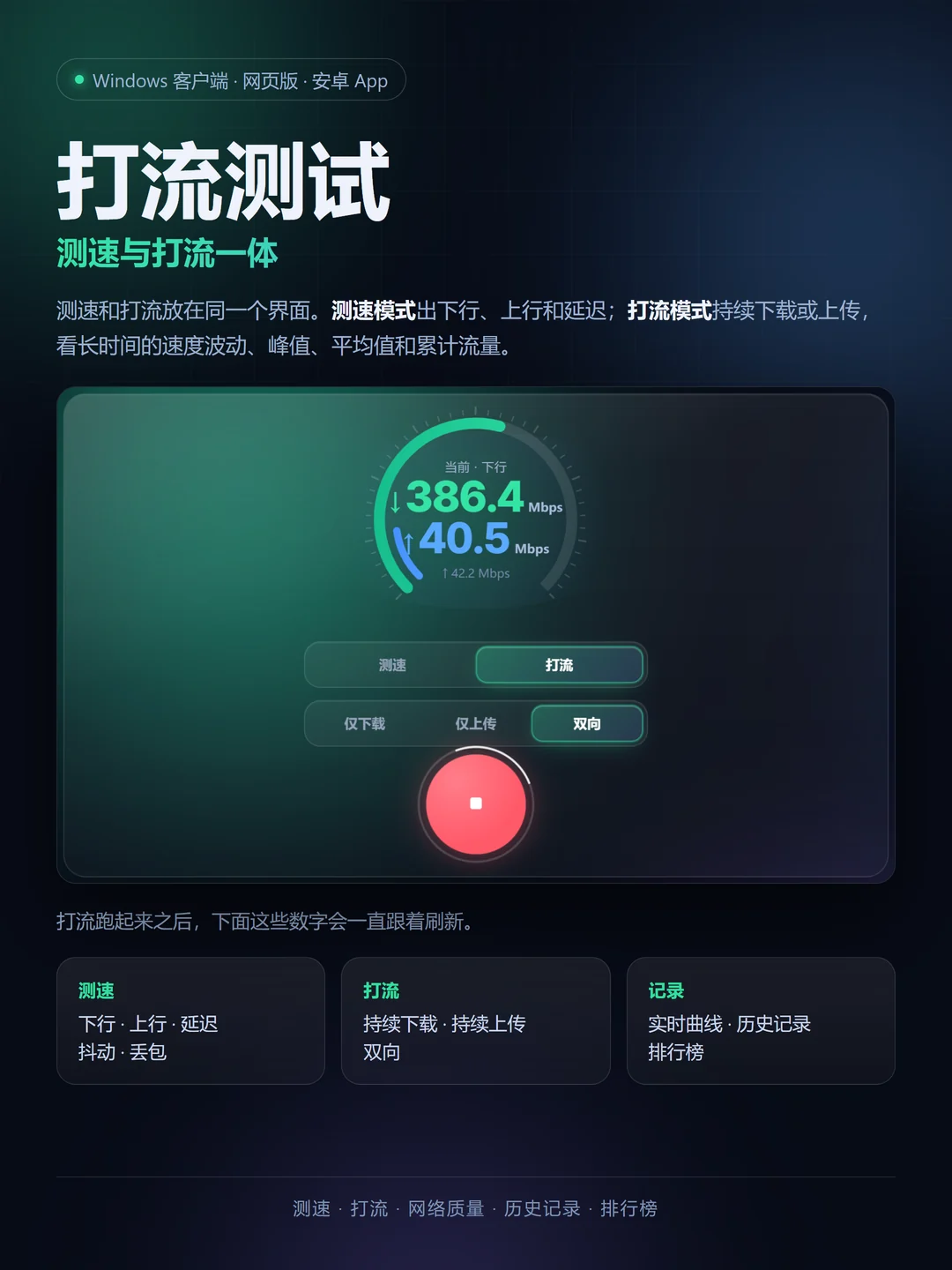
Speed testing and traffic streaming in one tool. Speed mode runs download, upload and latency in one pass; stream mode keeps downloading, uploading or both, so you can watch the rate move over time — peaks, averages and the total transferred. Switch modes whenever you like.
Use the Windows client on a PC; the web version covers Mac, iPhone and iPad. Servers, routers and containers use the lite build.

Windows 64-bit Web · no install Android optional Latest v3.44.241
Streaming · bidirectional
PML Speed Test
StreamSpeed LIVE
Down386.4Mbps
Up40.5Mbps
Peak down396.2
Avg throughput382.7
Transferred1.13 GB
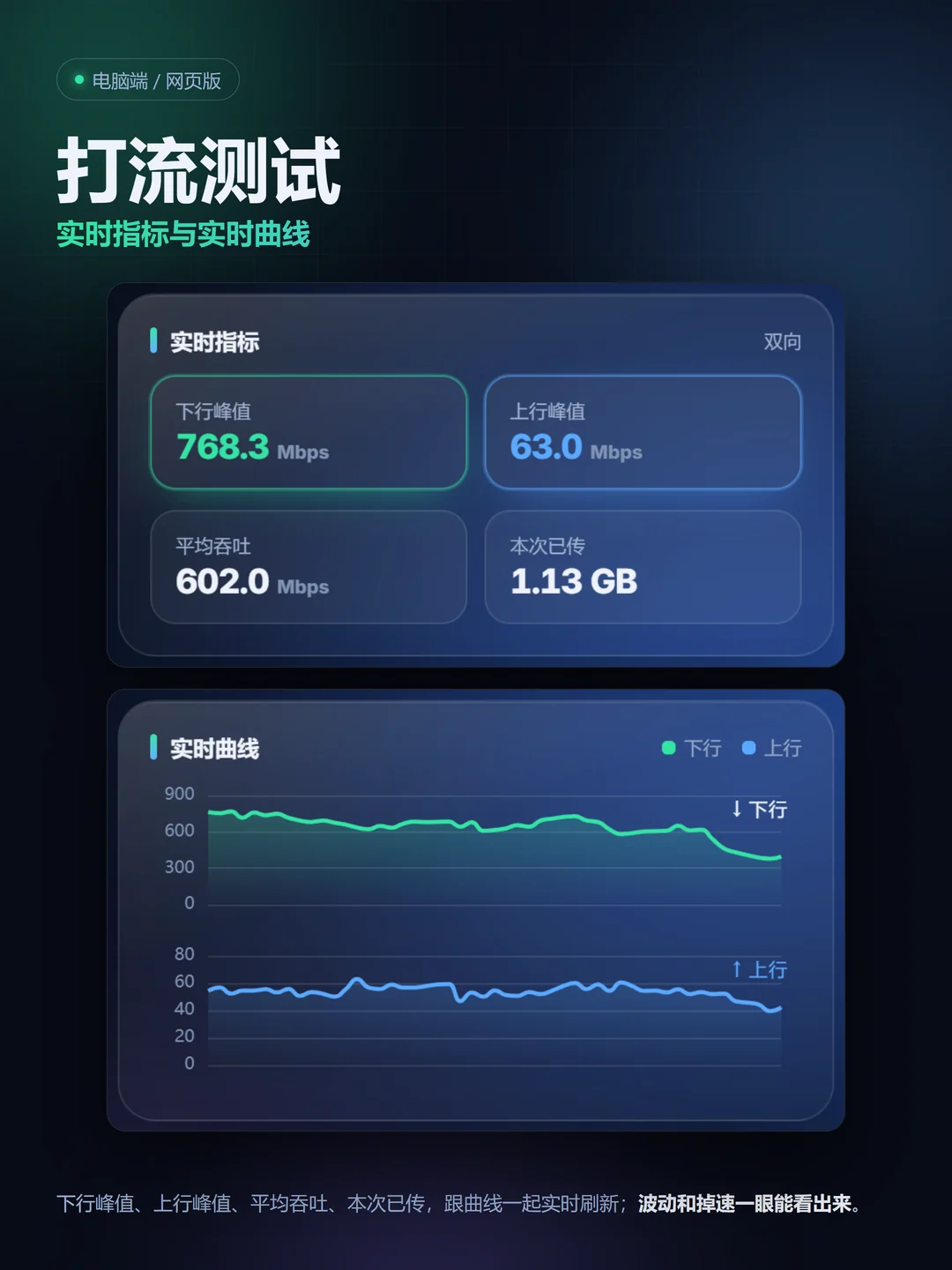
Live metrics
Down386.4
Up40.5
What it does

One device,
the whole link in view

A speed test is a sprint; streaming is a long run. Both share one set of readings and history, so switching never reloads the page.

01
Speed test

Down, up and latency in one pass

All three run in sequence and the result is shown immediately. Jitter and loss come from the same samples — no second pass.

02
Stream

Run for as long as you like

Keep downloading, keep uploading, or run both at once. Rate, peak, average and transferred keep updating, the chart fits the card width, and nothing stops on a timer.

03
History

Everything you run is kept

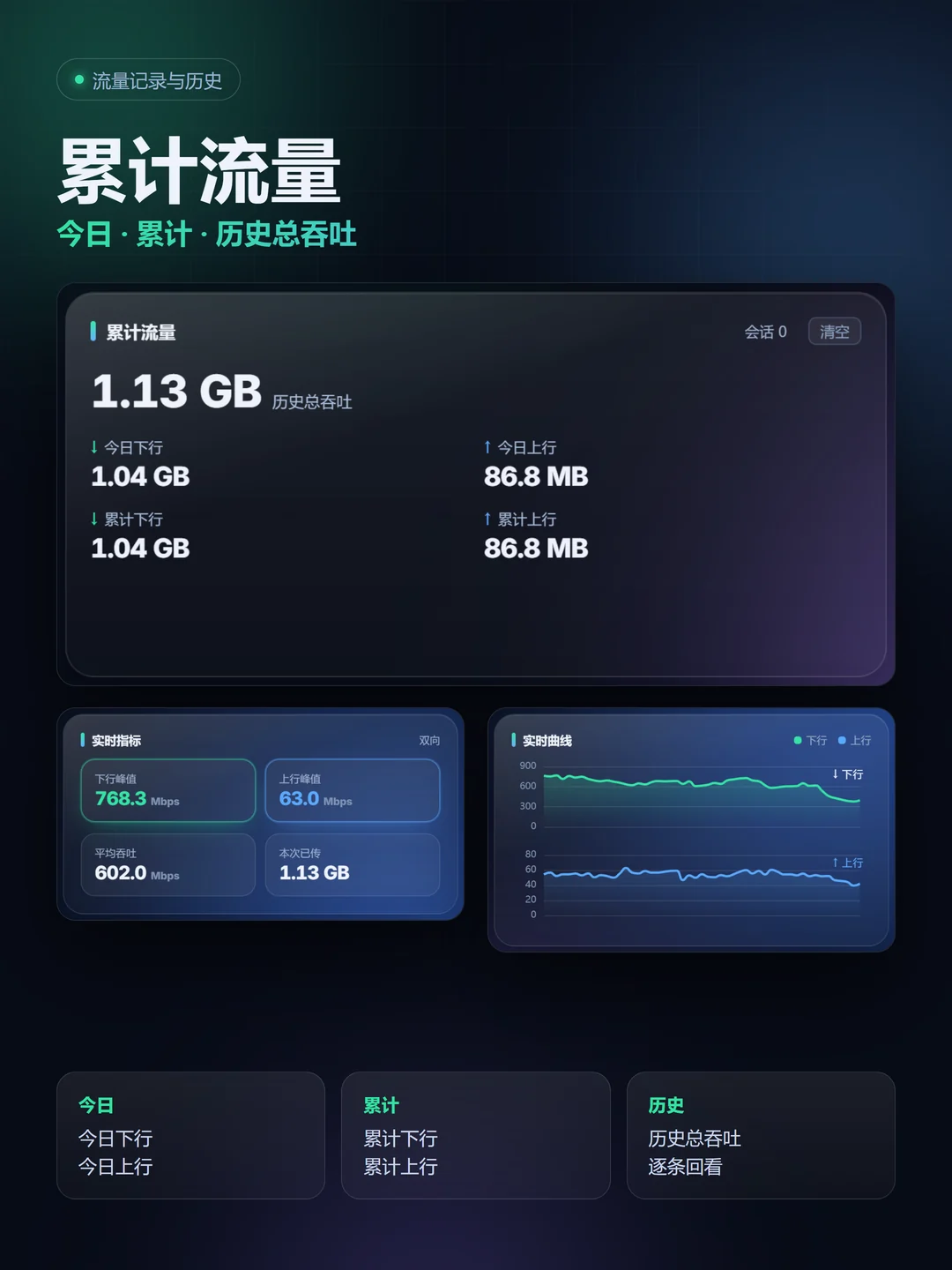
Today's and cumulative traffic plus the running total are stored on this device; past runs can be reviewed one by one, and rankings switch by month, week and day.

04
Platforms

Three platforms, one interface

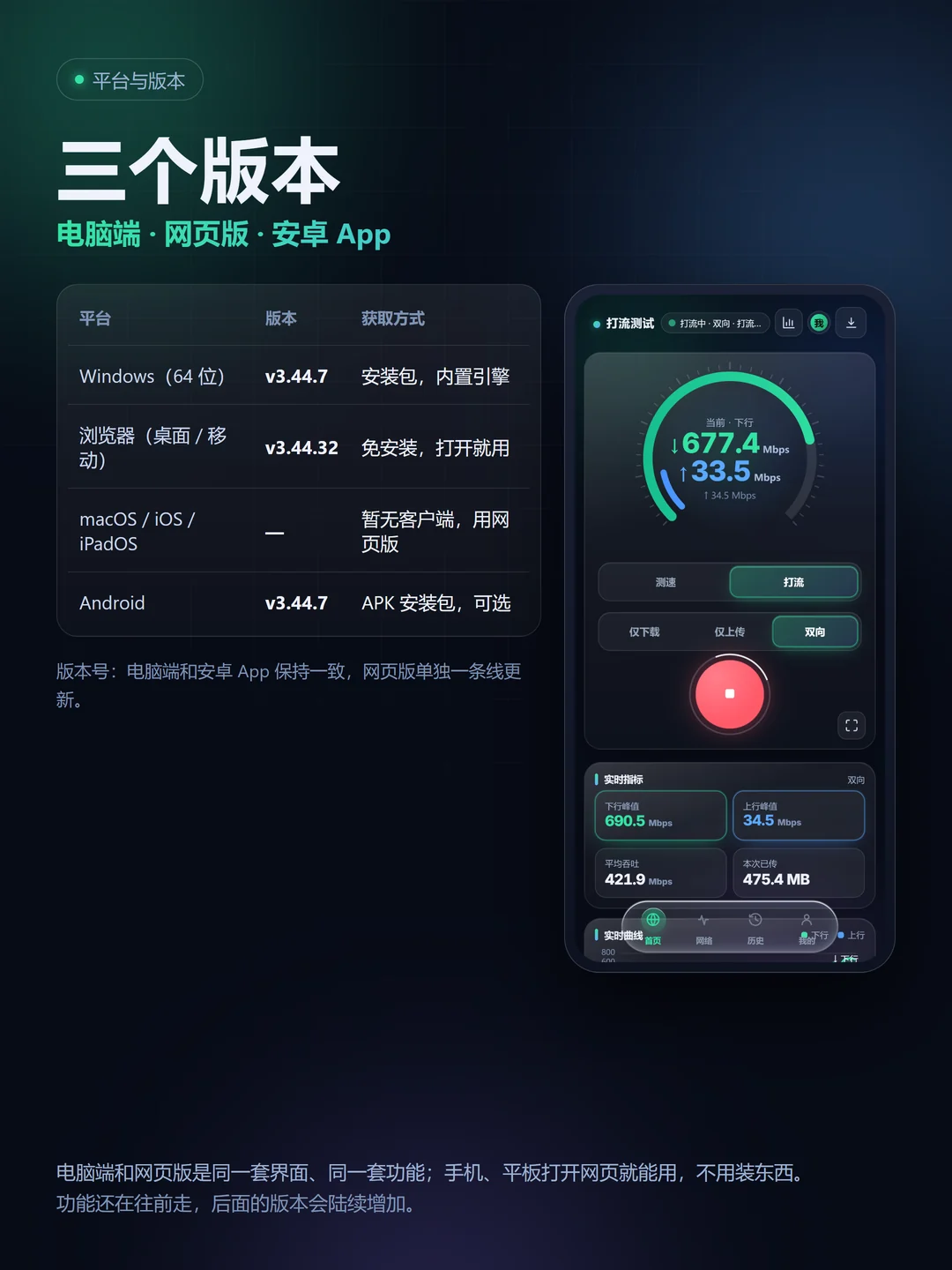
The Windows client, the web version and the Android app share one interface and one feature set. On a phone the web version just works; the app is optional.
主界面 实时指标与曲线 累计流量与历史 平台与版本
Real interface, dark theme
Screenshots

Same interface,
no relearning on a new device

The desktop client and the web version share one interface and one feature set. On a phone, open the web version; the Android app is optional.

All features

More detail than you'd expect

Grouped by purpose; everything below already ships in the client and the web version.

  • Down speed: current downstream bandwidth in one run
  • Up speed: measured on its own, recorded separately
  • Latency & jitter: from the same samples, shown right on the page
  • Packet loss: sampled with latency on the network quality page
  • Continuous download: long runs to watch fluctuation and stability
  • Continuous upload: pressure the upstream direction
  • Bidirectional streaming: both directions at once, for total throughput
  • Live metrics: peak down, peak up, average throughput, transferred
Lite · Linux / OpenWrt / Docker

A speed-test page
for servers and routers

The same engine as a lite build: it serves a local page you can open in any browser, and it also runs from the command line. Speed and streaming only — no Wi-Fi / CPE reading.

  • Linux: deb packages for amd64 / arm64 / armhf / i386, plus a generic tar.gz, with a system service
  • Router: ipk and apk packages; LuCI gets a speed-test page
  • Container: import the image, run the compose template, mount a data directory for config and history
3Install forms: Linux / OpenWrt / Docker
4Linux arches: amd64 / arm64 / armhf / i386
1Engine shared with the client
v3.44.9Current lite version
install · example, see the archive notes
# Linux (deb / tar.gz)
dpkg -i pml-lite-*.deb
# or run straight from the archive
./pml-linux-amd64 test

# OpenWrt
opkg install pml-lite-*.ipk
# then open the speed-test page in LuCI

# Docker
docker compose up -d
Platforms

Versions and platforms

Desktop and Android share a version number; the web version updates on its own; the lite build is numbered separately.

PlatformVersionHow to get
Windows (64-bit)v3.44.37Installer with the built-in engine; in-app updates
Browser (desktop / mobile)v3.44.241No install, open and use
macOS / iOS / iPadOS—No client; use the web version
Androidv3.44.103APK, optional
Linux (server / VM)v3.44.9deb package or generic tar.gz, with a system service
Router (OpenWrt)v3.44.9ipk / apk, with a LuCI speed-test page
Container (Docker)v3.44.9Image tar and compose template; mount a data directory
Changelog

Changelog

The client and the web version ship together: web changes apply on refresh, the client catches up after a restart.

  1. 2026-10-17Web v3.44.241
    Live chart now fits the card width: two side by side on wide screens, full width on narrow ones, and it no longer gets squeezed into a corner after resizing or going fullscreen. The four live metrics are coloured again — down green, up blue, matching the chart legend. My Network merges public IPv4 and IPv6 into one Public address row with a single toggle. Web only; the client catches up after a restart.
  2. 2026-10-12Lite v3.44.9
    The lite build arrives: Linux, OpenWrt and Docker, for servers and routers. It serves a local speed-test page and also runs from the command line. Speed and streaming only — no Wi-Fi / CPE reading. Each pack installs independently; existing clients and the web version are unaffected.
  3. 2026-10-08Web v3.44.235
    Fixed turning off Extreme mode leaving the whole page dark with a red glow until the theme was toggled again. It now returns to the previous theme immediately and remembers it after a reload.
  4. 2026-10-07Web v3.44.232
    Fixed the bottom bar flashing in on first load. Rebuilt the desktop and tablet bottom bar layout, page transitions and glass finish. The device page adds CPE integration, reading radio and cellular data from the connected OpenWrt / LuCI device, and Wi-Fi details now include transmit power. Web only.
  5. 2026-10-05Web v3.44.167
    Two fixes: the mobile bottom bar could drop to the very bottom of the page — it now stays pinned to the screen; tapping My twice no longer flashes the page.
  6. 2026-10-05Desktop / Android v3.44.37 · Web v3.44.166
    Web 3.44.166 fixes several known issues and refreshes the interface: a starfield theme, a liquid-glass bottom bar, new transitions and wider device support. The client needs a reinstall this time; later web updates still install themselves.
  7. 2026-10-04Desktop / Android v3.44.36 · Web v3.44.156
    Both desktop and Android need a reinstall. Save & connect now shows Connecting… and reports success or failure instead of doing nothing. Fixed the desktop device page not scrolling past one screen. More device support and a batch of smaller fixes.
  8. 2026-10-04Android v3.44.34
    A shell update, reinstall required. Fixes the Wireless page reading nothing on some Huawei devices: it now checks location, permission and nearby-devices access up front, shows which one is missing and offers a jump to settings.
  9. 2026-10-03Desktop / Android v3.44.33
    A shell update, reinstall required. The phone now bridges external links to the system browser; the built-in UI catches up to 3.44.134; the internal debug switch is gone.
  10. 2026-10-03Web v3.44.133 ~ v3.44.135
    Large-screen layout reworked: device and wireless pages expand with resolution instead of staying a narrow column. About gains Project home · Credits, with one shared credits list across platforms.
  11. 2026-10-02Web v3.44.86
    Ranking tabs (day / week / month / all) showed the same data; each period now has its own set.
  12. 2026-10-02Web v3.44.85
    With multiple NICs, the second card always showed 0 and only the first carried traffic; addresses re-register when they change.
  13. 2026-10-02Web v3.44.84
    The network quality page no longer reports IPv4 as undetected; region and ASN resolve from a local database in a second or two.
  14. 2026-10-01Web v3.44.80
    Rankings rebuilt: day / week / month / all, sortable by traffic, download or upload, filterable by network type. Network quality adds site connectivity, multi-source address comparison and NAT detection.
  15. 2026-09-30Desktop v3.44.22
    The desktop UI now updates itself; later page changes no longer need a reinstall.
  16. 2026-09-28Desktop v3.44.21
    On multi-NIC machines every adapter reported 0.
  17. 2026-09-28Web v3.44.76 ~ v3.44.79
    Repeated refreshes triggered the security filter; ranking columns were misaligned.
  18. 2026-09-28Desktop / Android v3.44.20
    Engine work: identity codes and cumulative traffic paths, preparing per-device stats.
Open API

Open API

To plug the source endpoint into your own speed-test client, request a key and get download and upload links right away. Test traffic goes straight to the source, not through this site.

ItemDetail
How to requestEmail verification; the key and both links are issued immediately
EndpointTreat the link as the source endpoint; GET returns the current best sources. ?fmt=url&redirect=1 redirects straight to one source, ?fmt=text returns a bare URL.
Client supportSingle-URL clients use the ?fmt=url&redirect=1 link; list clients read the response; config clients import the exported .conf or .json.
Full export/open/conf?key=… returns every source in one call
Reporting/open/report sends speed and traffic back to tune the sources
Open source

The code is on GitHub

Client, engine and server code live in one repository — the same source as the builds here. The repo is sanitized: source pools are public examples, with no private configuration.

Repository github.com/AnShengtok/pml-speedtest

Go engine, web and desktop UI, desktop shell, platform bindings, ingestion and dashboard, plus an optional upload target.

Open repository
Build Build it with Go

Desktop: cd client && go build ./cmd/pc; server: cd backend && go build -o pml-geo . — standard library only.
MIT license
打流测试 Download

Try it now

Free, no sign-up. The Windows client has the engine built in, the web version opens instantly, Android is optional; servers and routers use the lite build.

Windows

  • Windows 64-bit, v3.44.37
  • Built-in engine, ready to use
  • In-app updates
Download installer

Web version

  • No install, v3.44.241
  • Desktop and mobile browsers
  • Same interface as the client
Open web version

Android

  • APK, v3.44.103
  • Optional, same as the web version
  • Installs over older versions
Download APK

Latest version v3.44.241 · Changelog · Lite build (Linux / router / container)

Mirror downloads (123pan, passcode included in the link):Windows installer · Android APK

By An Xiaosheng